Migration design · 10 min read
Petabyte-scale database migration with near-zero downtime
We moved dozens of production HBase and Phoenix clusters, about 15 PB of data in total across about 25 AWS regions, from Amazon EKS clusters we ran ourselves to Salesforce's internal managed Kubernetes platform, which also runs on EKS, with only a few seconds of downtime at each cutover.
I led a team of six engineers on the migration and worked cross-functionally with partner teams. I designed the data copy and validation strategy, cutover and rollback, and the coordination that stopped the old and new clusters' control planes from acting on the same work.
On this page
Problem
The Big Data Storage team at Salesforce runs a large HBase fleet on AWS, serving live tenant traffic. We also operated the Amazon EKS clusters it ran on ourselves. The move had two goals: get onto the company's paved path, an internal managed Kubernetes platform with an Istio/Envoy service mesh, cluster management and integrated operations, and retire a Kerberos-based security setup. The largest cluster held about 1.5 PB of data.
Three constraints shaped every decision. No silent loss: a copy job that reports success is not evidence that the data arrived. Rollback after cutover must not drop writes taken on the new cluster. And tenants keep reading and writing throughout, so the only pause is the cutover itself.
Context
HBase is a distributed key-value database, and Phoenix adds SQL on top of it. HBase is an LSM store: writes collect in memory and are flushed to immutable files (HFiles), which compaction periodically merges. A delete writes a tombstone (delete marker) that masks older cells, and compaction later garbage-collects masked cells, expired cells and, eventually, the markers. Most of the complexity below comes from that last step.
Approach
The plan
Each environment moves in five steps:
- Replicate. Create a replication peer from the old cluster to the new one at time . From then on, every new WAL edit ships to the target.
- Copy history. Back up every table to object storage and restore it on the target, covering everything before and some of what came after.
- Validate the range table by table.
- Cut over. Drain clients, wait for replication to catch up, and switch them to the new cluster.
- Keep a way back. Run a reverse peer from new to old, and keep the old cluster for several weeks.
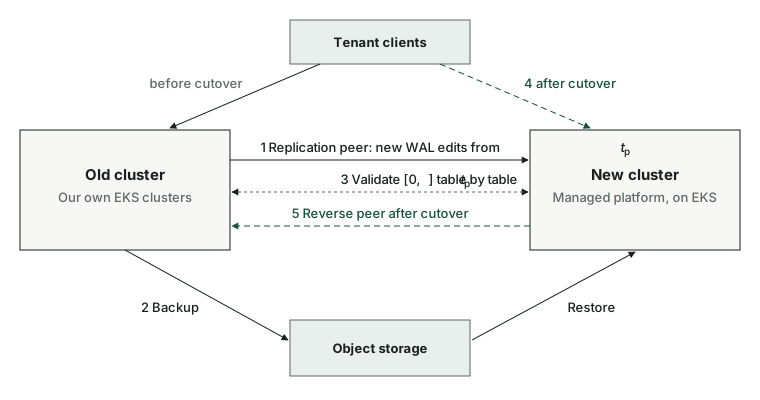
Steps 1 and 2 overlap on purpose. A cell is identified by (row, column, timestamp) and the copy preserves timestamps, so a put that arrives by both paths is idempotent, and starting replication before the snapshot means no write falls between them.
Deletes stop being idempotent once compaction gets involved.
Not every table moves whole. For some we copy only part of the data, and some are skipped, so we added that support to both the data copy and the replication layer, where a WAL filter decides what each migration peer ships. One internal service also keeps its data in Phoenix, and copying it created a split-brain risk that needed its own handling, described in Two control planes, one set of metadata.
Copying history: two paths, and write amplification
We copied history with backup and restore through object storage, which needs only bucket access from both sides and reuses the backup service's tracking, retries and throttling.
Writing that much data into a new cluster creates hotspots. An empty target table has one region, so the whole copy lands on one region server. We pre-split the largest tables at the source's split points and turned off the normalizer so it wouldn't merge the empty regions back. The other cost was the write path itself, which we eventually bypassed with bulk loading: the restore builds HFiles and hands them straight to the region servers.
The restore first wrote ordinary puts, so each input byte became a WAL (write-ahead log) entry, a flush and several rounds of compaction, each replicated by HDFS. At the region-server level, puts amplified writes 9.7×, and a 9 TB table took 16 hours to restore.
| Restore path | What it writes | DataNode writes for a 5 TB copy | What it costs later |
|---|---|---|---|
| Puts, normal settings | WAL, flushes, compactions, splits | 62.9 TB measured | Slow, and competes with tenant traffic |
| Puts, compaction and splits disabled | WAL and flushes | 38.3 TB measured | Re-enabling compaction starts a compaction storm that must finish before failover |
| Bulk load of prebuilt HFiles | Each HFile once | About 15 TB expected, not measured | No WAL, so replication doesn't see it; needs pre-split targets |
Disabling compaction defers the compaction writes to just before failover, when nothing else should be loading the cluster, so the middle row saves less than it seems.
Bulk load skips the WAL and compaction, so each byte is written once per replica.
When a delete arrives before its row
Replication and the historical copy run at the same time, so a row's delete can race the row itself to the target. One of our test rounds lost that race:
| When | Source cluster | Target cluster |
|---|---|---|
| t1 | A row is written, and the backup captures it | Nothing yet |
| t2 | The tenant deletes the row, writing a delete marker | The marker arrives by replication, with no row to hide yet |
| t3, a few days later | The marker still hides the row | Major compaction purges the marker once it ages out of Phoenix's look-back window |
| t4, a few hours later | Unchanged | The restore writes the old row. Nothing hides it, so the row is back |
Validation showed tens of thousands more rows on the target than on the source, in a table of billions of rows, and tracing them led to this sequence.
Major compaction assumes a store already holds every older write, so it drops a delete marker once nothing older is left for it to hide, even with KEEP_DELETED_CELLS = TRUE. On a migration target that assumption is false, because older rows are still on their way from the restore. A later production wave hit the same problem with delete-family markers.
The fix was a compaction rule: nothing is purged on the target until the historical copy and its validation are complete. The backup system already had a retention coprocessor, built to keep data until a backup has read it. It hooks flush, compaction and reads, and while it is active it overrides the column family's retention: unlimited versions, delete markers kept, and a TTL stretched to cover everything since the copy started, plus a buffer. I extended it in two ways. It now covers every replication peer of the target, because the target's own disaster-recovery peer compacts independently and could bring back the same rows. And it supports a global TTL that applies to all tables at once.
Two control planes, one set of metadata
A data-management service runs tenant lifecycle work on top of HBase and Phoenix: backups, tenant moves between clusters, deletes and size estimates. Its state lives in HBase tables, and during the migration it runs on both clusters, because the service also runs the migration's data copy: backups on the source and restores on the target.
Without its metadata, clients on the new cluster couldn't see the status of anything submitted before cutover, or after a rollback, anything submitted since cutover. With it, the service runs on both sides against the same pending jobs, so any job can be triggered from either side, or from both. That is split brain.
We copied the metadata anyway, and to fix the split brain we made ownership explicit with a mode flag on the target's service:
| Phase | Source service | Target service |
|---|---|---|
| Before cutover | Active coordinator: all commands, plus the backups for the migration copy | Copy-only mode: processes nothing except restores for its own migration copy |
| Cutover | Drained through the HA mechanism, then shut down | Mode flag cleared; takes over every command, and in-flight MapReduce jobs are retried on its side |
| Rollback | Takes over again | Shut down, or back in copy-only mode |
We rejected keeping the target's service off and letting the source run the restores too. That loads the source's compute, needs cross-cluster connectivity, and leaves the target's service untested until it has to take over.
Data consistency validation
Before cutover we also had to show that the data was the same on both clusters, and we tried several approaches:
| Method | How it works | Where it fell short |
|---|---|---|
| Backup vs restore counters | Compare the MapReduce row counters of both jobs | Relies on the copy jobs' own statistics, which can be wrong (below) |
Row counts per side (RowCounter, SQL count(*)) | Count each side, compare | Scan timeouts on large tables; delete markers and compaction make counts differ legitimately; SQL can't filter by write time |
| Row-by-row (VerifyReplication) | One MapReduce job reads both sides and compares every row | Exhaustive but expensive; full scans time out |
| Chunk checksums (HashTable/SyncTable) | Hash row groups on both sides, diff mismatched groups | Hashing runs client-side; no time ranges or row filters |
| Server-side chunk checksums with filters | Region servers hash each chunk, with predicates pushed down and progress checkpointed | Had to be built; became the path we used |
We started by comparing the row counts from the backup and restore jobs, and by running VerifyReplication. The job counters include every retried task's rows, so on one very large table the restore counter disagreed with the source's count. VerifyReplication timed out on large tables: on one perf cluster, most of its mappers timed out. We eventually used the server-side checksum comparison, which an engineer on the Phoenix team built to our requirements. Even then, tables with a TTL showed harmless mismatches near the expiry cut-off, because the two clusters expire rows at slightly different moments, and those needed manual scans to clear.
Avoiding noisy-neighbour problems from a resource-intensive copy
- Fewer concurrent mappers. We capped how many copy mappers run at once, which limits the read traffic on the source.
- Client-side throttling. A mapper sleeps when a batch takes longer than a latency baseline, set to about 50 ms after testing.
- Snapshot reads where possible. Backups read table snapshots straight from HDFS on a best-effort basis, so the copy doesn't go through the region servers serving tenants. In the first production environment, backup jobs still read live region servers, and tail latency rose for hours without affecting availability. Snapshot reads became the default after that.
Throttling protects tenants but makes the copy take longer, and that is a trade-off with cost: until cutover we pay to run both clusters side by side, so every extra day of copying is another day of double infrastructure. A longer copy also needs a longer retention window on the target.
Cutover and rollback
Replication is asynchronous, so cutover can't just repoint clients: a write still on its way to the target would look lost to consumers such as change-data capture. We used the Phoenix client's HA framework, in which clients connect to a pair of clusters. Cutover puts both clusters into standby and lets in-flight requests drain, waits for replication lag to reach zero, and then makes the target active. Clients reconnect to it, and that drain is the only pause tenants see.
Rollback is the same procedure in reverse. A reverse replication peer from the new cluster to the old one keeps the old cluster up to date with every write taken after cutover, so rolling back doesn't lose them.
What broke in testing
End-to-end test rounds and pre-production failovers found these. Most changed the code or the runbook, not the design.
- Copies that read nothing. Two tables copied zero rows and reported success, because the snapshot's restore directory was deleted mid-job. That became HBASE-29662, so the job now fails instead.
- Very large rows. Rows over 1 GB failed to copy even with 8 GB mappers, because snapshot-based MapReduce couldn't read partial rows, so I filed HBASE-29104.
- Expiring credentials. Authentication delegation tokens expired before the longest copy jobs finished.
Result
Cutover took only a few seconds. We validated every cluster before its cutover and investigated each discrepancy.
A migration at this scale is complex for more than one reason. It has many steps, and each one needs reasoning about race conditions and their side effects on the business, such as a deleted row coming back or the same job running on both clusters. And the strategy has to adapt to the failures you find: several of the mechanisms above came out of test rounds that broke.